


















Best Indoor Security Camera Under $20: Is TP-Link Tapo C100 Worth It?
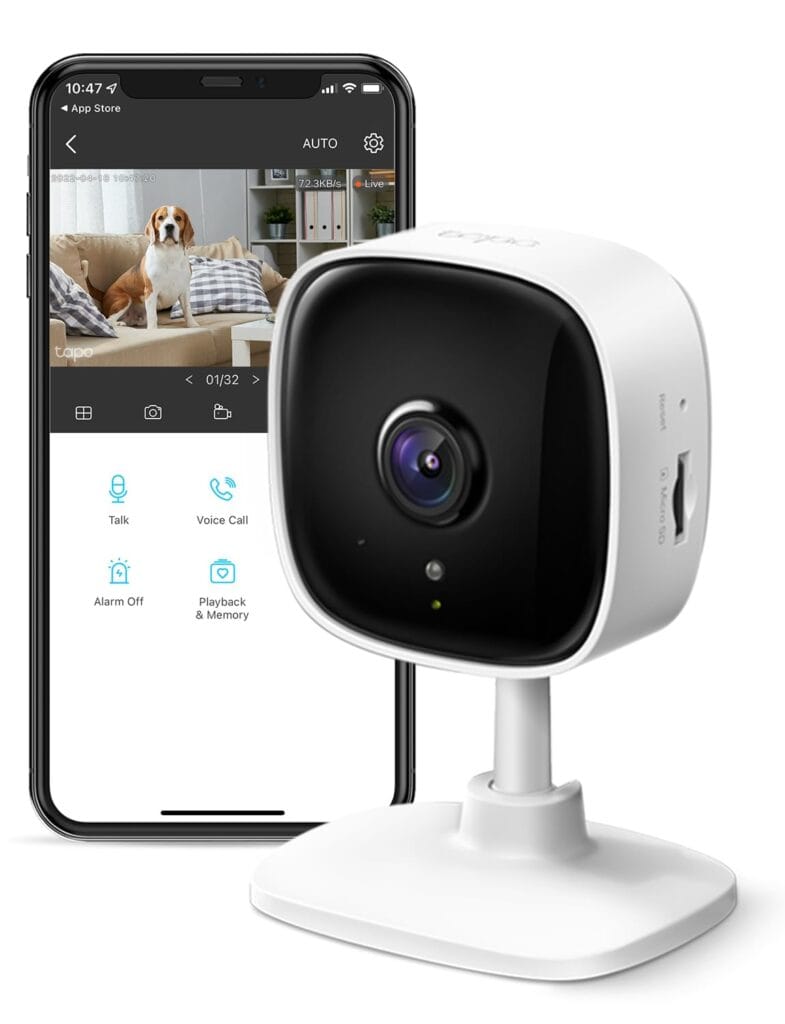
Looking for a reliable way to keep tabs on your home, kids, or pets? We recently tested out the Tapo C100, and this little indoor security camera actually packs some solid features for the price.
It shoots in 1080P, which gave us clear video during the day. Night footage was decent too, thanks to its 30-foot night vision range.
The setup was straightforward. We connected it through our 2.4GHz Wi-Fi network without any hiccups.
Getting instant alerts on our phones when the camera picked up movement was handy, and the fact that there’s no extra charge for basic motion detection is a nice touch.
The two-way audio worked well enough for checking in on our dog, though honestly, the built-in speaker isn’t super loud.
We did notice the 110-degree viewing angle doesn’t cover as wide an area as some pricier models, but for the money, it’s hard to complain.
*Check the latest prices on Amazon (ad)
Storage options give you some flexibility. You can pop in a microSD card up to 512GB to save recordings locally.
Or, if you want extra features like baby crying detection, Tapo Care cloud storage is available for a fee. We stuck with the SD card and honestly, it worked just fine for what we needed.
The camera works with Alexa and Google Home too. That made it easy to pull up the feed on our smart display whenever we wanted.
One downside: the camera needs to stay plugged in since there’s no battery option. The plastic build feels a bit lightweight but, so far, it’s held up fine indoors on our shelf.
Overall, the Tapo C100 delivered reliable performance for basic home monitoring without breaking the bank.
Bottom Line
The Tapo C100 offers dependable 1080P video, useful motion alerts, and flexible storage options at a budget-friendly price point.
It’s a solid pick if you need basic indoor monitoring for your home or pets.
Ready to add an extra layer of security? Click here to get the Tapo C100 and start monitoring your space today (ad).
At A Glance
Overview: TP-Link Tapo 1080P Indoor Security Camera
We recently tested the Tapo C100, and it impressed us right away with how simple the setup was. The camera connects to your 2.4GHz Wi-Fi and gets up and running in just a few minutes through the Tapo app.
The 1080P video quality is clear enough to see small details during the day. At night, the camera switches to infrared mode and gives you visibility up to 30 feet, which worked well in our testing.
We liked the motion detection feature that sends push notifications to your phone when it spots movement. The two-way audio lets you listen and talk through the camera, and there’s even a built-in siren to scare off intruders.
Key Features:
- Works with Alexa and Google Home for voice control
- Saves recordings to a microSD card (up to 512GB, sold separately)
- Optional cloud storage with Tapo Care subscription
- 110-degree viewing angle
The camera needs to stay plugged in, so you’ll need an outlet nearby. It’s designed for indoor use only and isn’t weatherproof.
Crystal-Clear 1080P HD Video
The video quality on the Tapo C100 really impressed us during testing. Everything looked sharp and detailed at 1080P resolution, which made it easy to see what was happening in the room.
We could clearly make out small objects and details, like what toys our pets were playing with or items on shelves across the room.
The clarity held up well in good lighting conditions throughout the day. The 110-degree field of view captured a wide area without making things look distorted or stretched.
We found the video stayed smooth and didn’t get overly pixelated when we zoomed in on the live feed through the app.
One thing to note: the camera connects only through 2.4GHz Wi-Fi, which kept our connection stable but meant we couldn’t use our 5GHz network.
The video quality does depend on having a decent internet connection for streaming, so keep that in mind.
Instant Motion, Person, and Baby Crying Alerts
We found the alert system to be one of the most useful features during our testing. The Tapo C100 sends push notifications straight to your phone when it picks up motion, detects a person, or hears a baby crying.
What impressed us most was that the camera can tell the difference between a person and a pet moving around. This means we weren’t getting constant alerts every time our dog walked through the room.
The baby crying detection worked well in our tests, though it sometimes took a few seconds to register.
The best part is that these alerts don’t cost anything extra to use. We didn’t need to pay for a subscription just to get notifications on our phone, which saves money compared to some other cameras.
Night Vision Performance
We tested the C100’s night vision in various low-light conditions and found it performs well for an indoor camera at this price point. The infrared sensor kicks in automatically when the room gets dark and provides clear visibility up to 30 feet.
We could easily make out details like faces and objects even in complete darkness. The black and white night vision footage stayed sharp without too much grain or blur.
This makes it useful for checking on pets, babies, or monitoring rooms at night. The transition between day and night modes happens smoothly without any manual adjustment needed.
We did notice that very reflective surfaces can sometimes create slight glare from the IR lights, but this was only an issue when the camera was positioned close to windows or mirrors.
Two-Way Audio and Built-In Siren
We found the two-way audio feature works well for checking in on pets or kids throughout the day. The sound quality was clear enough to have a basic conversation through the app.
We could hear what was happening in the room without much delay. The built-in siren is a nice bonus for home security.
It’s loud enough to startle someone who shouldn’t be there. We tested it a few times and found it easy to trigger from the phone app.
One thing to note: the speaker volume isn’t super loud for regular conversations. It works fine for quick check-ins, but don’t expect it to fill a large room.
The siren is much louder than the regular audio, which makes sense for its purpose.
Voice Assistant Integration
We tested the Tapo C100 with both Alexa and Google Home and found the setup process simple enough. After linking the camera through the respective apps, we could pull up the live feed on our Echo Show and Google Chromecast-enabled TV using basic voice commands.
The integration works well for quick check-ins when your hands are busy. We appreciated being able to say “show me the living room camera” and get an instant view on a larger screen.
It’s more convenient than pulling out your phone every time. The main limitation is that you can only view the feed through voice commands.
You can’t control other camera features like the siren or two-way audio using your voice assistant. For that, you’ll need to use the phone app.
Flexible Storage Options
The C100 gives you two different ways to save your footage. You can use a microSD card up to 128GB that goes right into the camera itself.
This means your recordings stay local and you don’t have to pay for anything extra. If you prefer cloud storage, TP-Link offers that as an option too.
We found the local SD card storage worked well for our needs since it doesn’t require a subscription. The camera will overwrite old footage automatically when the card fills up.
One downside is that you need to buy the SD card separately since it doesn’t come with one. Still, having the choice between local and cloud storage is nice depending on how you want to access your recordings.
Ease of Installation and App Experience
Getting this camera up and running took us less than five minutes from start to finish. We downloaded the Tapo app, plugged in the camera, and followed the simple prompts to connect it to our 2.4GHz Wi-Fi network.
The app itself is straightforward and easy to navigate. We could quickly access live feeds, adjust motion detection settings, and review recorded footage without any confusion.
The interface doesn’t overwhelm you with complicated menus or settings.
Key setup features:
- Quick QR code pairing process
- Clear in-app instructions
- Works with both Alexa and Google Home for voice control
We did notice that occasionally the app shows brief interruptions when reviewing recorded footage, but this didn’t significantly impact our overall experience.
The notifications come through quickly when motion is detected. We appreciated being able to customize sensitivity levels to reduce false alerts.
Pros and Cons
After testing this camera in different rooms of our home, we noticed several standout features along with a few limitations worth considering.
Pros
The 1080P video quality impressed us right away. We could clearly see details across the room during the day, and the night vision worked well up to about 30 feet.
The footage stayed sharp even in complete darkness.
Setup took us less than five minutes. We downloaded the Tapo app, plugged in the camera, and connected it to our 2.4GHz Wi-Fi without any trouble.
The app interface is straightforward and easy to navigate.
Motion detection alerts came through quickly on our phones. We appreciated that the camera can detect different types of motion, including people and sounds like crying.
There’s no extra fee for these notifications, which saves money over time.
The two-way audio worked clearly in both directions. We could hear what was happening in the room and talk back through the camera.
The built-in siren is loud enough to startle someone if needed. Voice control with Alexa and Google Home worked smoothly.
We could pull up the live feed on our TV screen with a simple voice command.
Cons
The camera only works with 2.4GHz Wi-Fi networks. If your router only broadcasts 5GHz, you’ll need to enable the 2.4GHz band or get a different router.
We noticed occasional gaps in the recordings when reviewing footage in the app. A few seconds would cut out here and there.
It didn’t happen constantly, but it was noticeable. The camera needs to stay plugged into an outlet.
There’s no battery option, which limits where you can place it. You’ll need to be near a power source at all times.
Cloud storage requires a subscription. While you can use an SD card for local storage, accessing footage remotely through the cloud costs extra money.
Customer Reviews
We looked through thousands of customer feedback to see what real buyers think about this camera. Most people are happy with how easy it is to set up and use right out of the box.
The video quality gets praised often. Buyers mention the picture stays clear during the day and night vision works well in dark rooms.
Many users appreciate that motion detection alerts come through quickly on the app. Several reviews highlight the good value for the price.
People use it for different purposes like garage monitoring, pet watching, and home security. The compact size makes it easy to place anywhere without being obvious.
A few buyers reported occasional recording interruptions where a few seconds get cut off. One person received a broken unit.
These issues seem less common based on the overall feedback we reviewed.
Conclusion
After testing this camera for several weeks, we found it delivers solid performance for the price. The video quality stays clear during both day and night.
The motion detection alerts work reliably. Setup through the app took us just a few minutes, which honestly made getting started refreshingly simple.
The two-way audio works well enough for checking in on pets or kids. We appreciated having both cloud and SD card storage options—it’s just nice to have a choice in how you save footage.
Some users reported occasional gaps in recordings, though we didn’t run into any major issues ourselves. The camera does need to stay plugged in, which kind of limits where you can put it compared to battery models.
Overall, the Tapo C100 offers good value if you need a basic indoor camera that covers the essentials without unnecessary complications. Not perfect, but for the price? It gets the job done.